

1. Photorealism & Aesthetics
Optimize your visual output with these high-fidelity prompts.
1.1. Hyper-Realistic Crowd Composition
Handling complex compositions with multiple famous faces and specific lighting.
Create a hyper-realistic, ultra-sharp, full-color large-format image featuring a massive group of celebrities from different eras, all standing together in a single wide cinematic frame. The image must look like a perfectly photographed editorial cover with impeccable lighting, lifelike skin texture, micro-details of hair, pores, reflections, and fabric fibers.

GENERAL STYLE & MOOD: Photorealistic, 8k, shallow depth of field, soft natural fill light + strong golden rim light. High dynamic range, calibrated color grading. Skin tones perfectly accurate. Crisp fabric detail with individual threads visible. Balanced composition, slightly wide-angle lens (35mm), center-weighted. All celebrities interacting naturally, smiling, posing, or conversing. Minimal background noise, but with enough world-building to feel real.

THE ENVIRONMENT: A luxurious open-air rooftop terrace at sunset overlooking a modern city skyline. Elements include: Warm golden light wrapping around silhouettes. Polished marble.
1.2. 2000s Mirror Selfie
A structured JSON prompt to generate an authentic early-2000s aesthetic.
Create a 2000s Mirror Selfie of yourself using Gemini Nano Banana.

{
  "subject": {
    "description": "A young woman taking a mirror selfie with very long voluminous dark waves and soft wispy bangs",
    "age": "young adult",
    "expression": "confident and slightly playful",
    "hair": {
      "color": "dark",
      "style": "very long, voluminous waves with soft wispy bangs"
    },
    "clothing": {
      "top": {
        "type": "fitted cropped t-shirt",
        "color": "cream white",
        "details": "features a large cute anime-style cat face graphic with big blue eyes, whiskers, and a small pink mouth"
      }
    },
    "face": {
      "preserve_original": true,
      "makeup": "natural glam makeup with soft pink dewy blush and glossy red pouty lips"
    }
  },
  "accessories": {
    "earrings": {
      "type": "gold geometric hoop earrings"
    },
    "jewelry": {
      "waistchain": "silver waistchain"
    },
    "device": {
      "type": "smartphone",
      "details": "patterned case"
    }
  },
  "photography": {
    "camera_style": "early-2000s digital camera aesthetic",
    "lighting": "harsh super-flash with bright blown-out highlights but subject still visible",
    "angle": "mirror selfie",
    "shot_type": "tight selfie composition",
    "texture": "subtle grain, retro highlights, V6 realism, crisp details, soft shadows"
  },
  "background": {
    "setting": "nostalgic early-2000s bedroom",
    "wall_color": "pastel tones",
    "elements": [
      "chunky wooden dresser",
      "CD player",
      "posters of 2000s pop icons",
      "hanging beaded door curtain",
      "cluttered vanity with lip glosses"
    ],
    "atmosphere": "authentic 2000s nostalgic vibe",
    "lighting": "retro"
  }
}
1.9. Bathroom Mirror Selfie
Create a candid mirror selfie with specific styling and composition
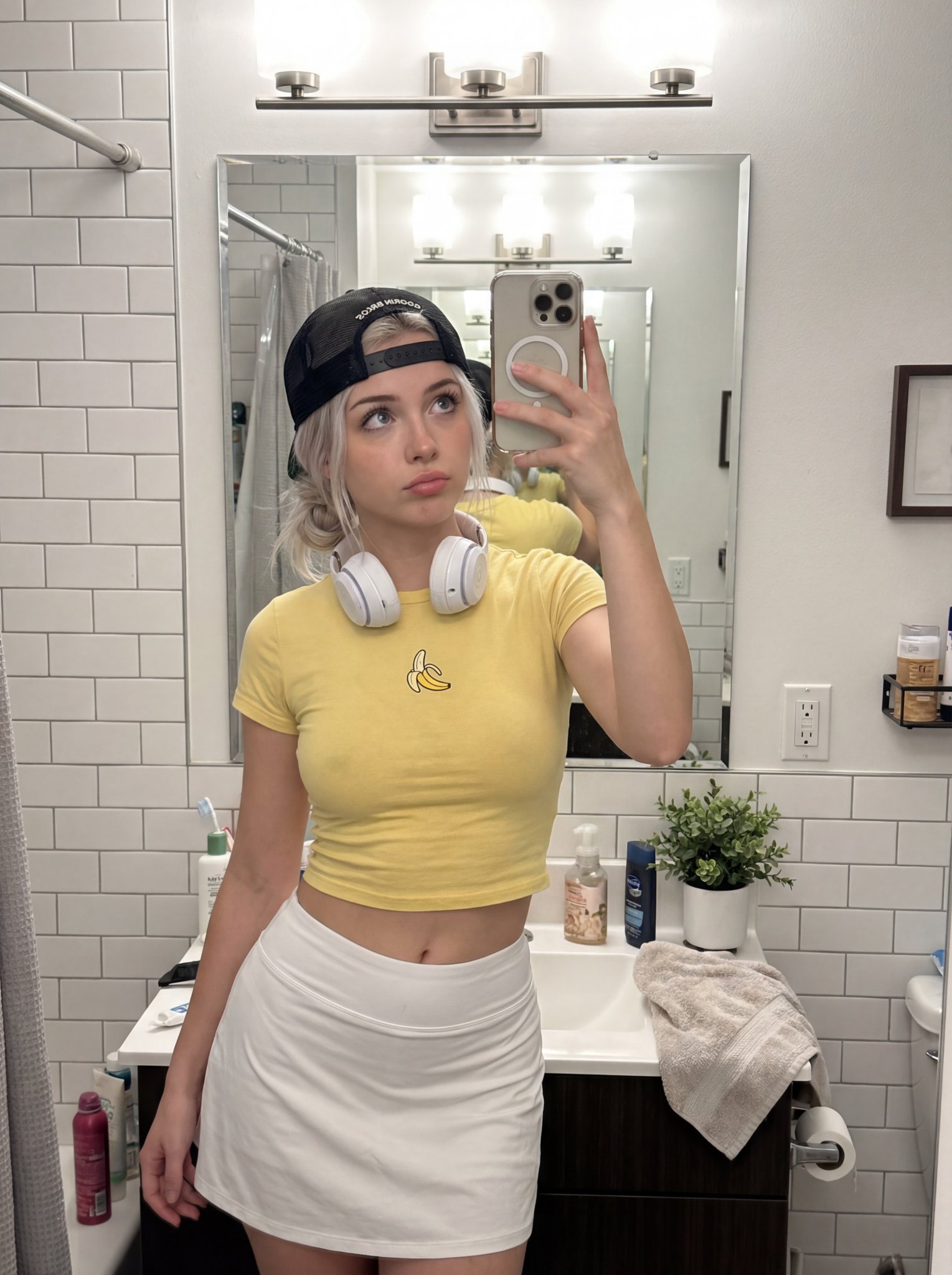
{
  "subject": {
    "description": "Young woman taking bathroom mirror selfie, innocent doe eyes but the outfit tells another story",
    "mirror_rules": "facing mirror, hips slightly angled, close to mirror filling frame",
    "age": "early 20s",

    "expression": {
      "eyes": "big innocent doe eyes looking up through lashes, 'who me?' energy",
      "mouth": "soft pout, lips slightly parted, maybe tiny tongue touching corner",
      "brows": "soft, slightly raised, faux innocent",
      "overall": "angel face but devil body, the contrast is the whole point"
    },

    "hair": {
      "color": "platinum blonde",
      "style": "messy bun or claw clip, loose strands framing face, effortless"
    },

    "body": {
      "waist": "tiny",
      "ass": "round, full, fabric of shorts riding up and clinging between cheeks, every curve visible through thin athletic material",
      "thighs": "thick, soft, shorts barely containing"
    },

    "clothing": {
      "top": {
        "type": "ULTRA mini crop tee",
        "color": "yellow",
        "graphic": "single BANANA logo/graphic",
        "fit": "barely containing chest, fabric stretched tight, ends just below, shows full stomach"
      },
      "bottom": {
        "type": "tight tennis skort or athletic booty shorts",
        "color": "white",
        "material": "thin stretchy athletic fabric",
        "fit": "vacuum tight, riding up, clinging between cheeks, fabric creases visible, leaving nothing to imagination"
      }
    },

    "face": {
      "features": "pretty - big eyes, small nose, full lips",
      "makeup": "minimal, natural, lip gloss, no-makeup makeup"
    }
  },

  "accessories": {
    "headwear": {
      "type": "Goorin Bros cap",
      "details": "black with animal patch, worn backwards or tilted"
    },
    "headphones": {
      "type": "over-ear white headphones",
      "position": "around neck"
    },
    "device": {
      "type": "iPhone",
      "details": "visible in mirror, held at chest level"
    }
  },

  "photography": {
    "camera_style": "casual iPhone mirror selfie, NOT professional",
    "quality": "iPhone camera - good but not studio, realistic social media quality",
    "angle": "eye-level, straight on mirror",
    "shot_type": "3/4 body, close to mirror",
    "aspect_ratio": "9:16 vertical",
    "texture": "natural, slightly grainy iPhone look, not over-processed"
  },

  "background": {
    "setting": "regular apartment bathroom",
    "style": "normal NYC apartment bathroom, not luxury",
    "elements": [
      "white subway tile walls",
      "basic bathroom mirror with good lighting above",
      "simple white sink vanity",
      "toiletries visible - skincare bottles, toothbrush holder",
      "towel hanging on hook",
      "maybe shower curtain edge visible",
      "small plant on counter"
    ],
    "atmosphere": "real bathroom, lived-in, normal home",
    "lighting": "good vanity lighting above mirror - bright, even, flattering but not studio"
  },

  "vibe": {
    "energy": "innocent face + sinful body = the whole game",
    "mood": "just got ready for tennis but making content first, 'what?' expression while wearing basically nothing",
    "contrast": "doe eyes + ass eating the shorts = lethal",
    "caption_energy": "'tennis anyone? 🍌' or 'running late oops'"
  }
}
1.16. Magazine Cover Portrait
Create a glossy magazine cover
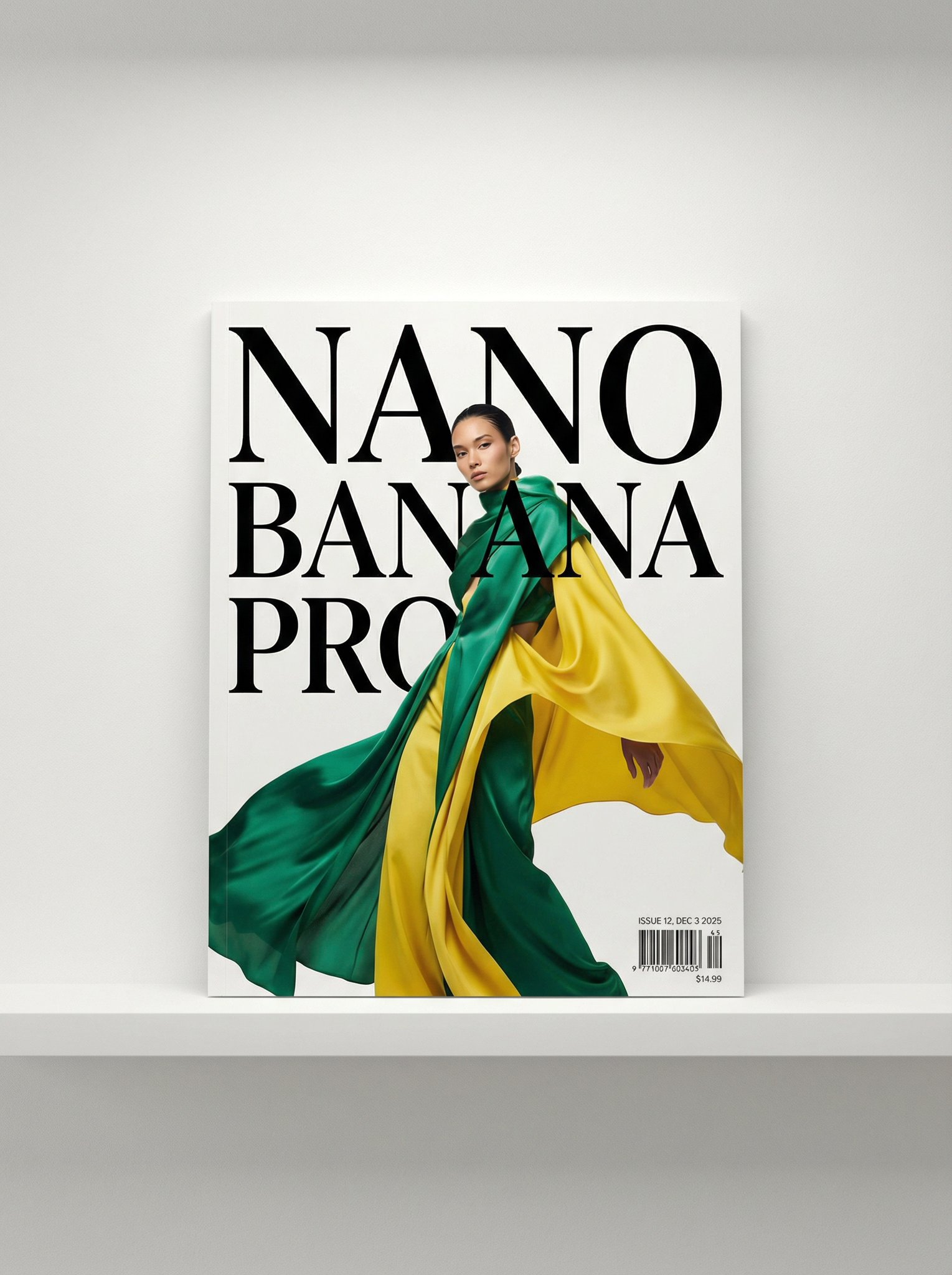
A photo of a glossy magazine cover, the cover has the large bold words "Nano Banana Pro". The text is in a serif font, black on white, and fills the view. No other text.

In front of the text there is a dynamic portrait of a person in green and banana yellow colored high-end fashion.

Put the issue number and today's date in the corner along with a barcode and a price. The magazine is on a white shelf against a wall.
2. Creative Experiments
Prompts focused on pushing the boundaries of composition and logic.
2.1. Star Wars "Where's Waldo"
Testing the model's ability to handle dense crowds.
A where is waldo image showing all Star Wars characters on Tatooine

First one to pull this off. First take. Even Waldo is there.
2.9. Split View 3D Render - iPhone 17 Pro
Create a 3D render with realistic left half and wireframe right half
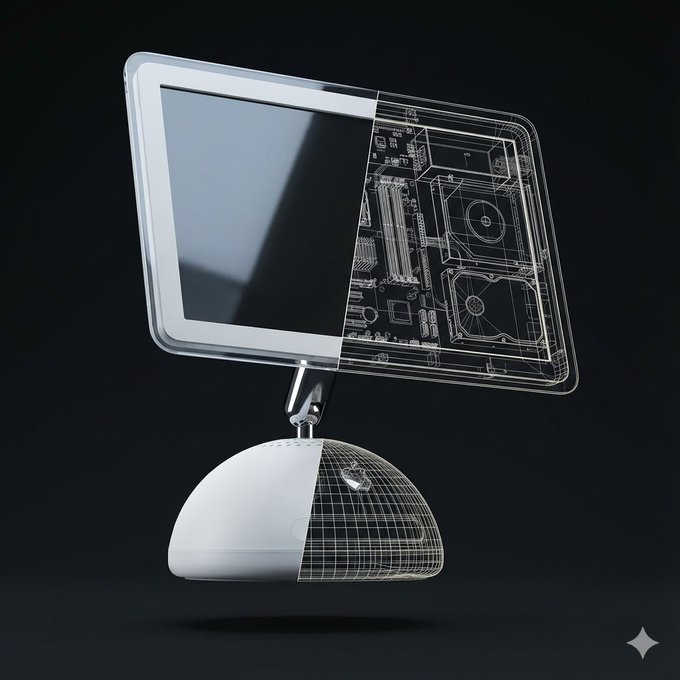
Create a high-quality, realistic 3D render of exactly one instance of the object: [Orange iPhone 17 Pro].
The object must float freely in mid-air and be gently tilted and rotated in 3D space (not front-facing).
Use a soft, minimalist dark background in a clean 1080×1080 composition.
Left Half — Full Realism
The left half of the object should appear exactly as it looks in real life
— accurate materials, colors, textures, reflections, and proportions.
This half must be completely opaque with no transparency and no wireframe overlay.
No soft transition, no fading, no blending.
Right Half — Hard Cut Wireframe Interior
The right half must switch cleanly to a wireframe interior diagram.
The boundary between the two halves must be a perfectly vertical, perfectly sharp, crisp cut line, stretching straight from the top edge to the bottom edge of the object.
No diagonal edges, no curved slicing, no gradient.
The wireframe must use only two line colors:
Primary: white (≈80% of all lines)
Secondary: a color sampled from the dominant color of the realistic half (<20% of lines)
The wireframe lines must be thin, precise, aligned, and engineering-style.
Every wireframe component must perfectly match the geometry of the object.
Strict Single-Object Rule
Render only ONE object in the entire frame.  Render only one physical object.
Do NOT show a second object from any angle. Do NOT show a second object as a reflection, shadow, silhouette, outline, ghost image, or transparency. Do NOT show a second object for comparison or display purposes. Do NOT show both the front and the back separately.
Do NOT show an extra device behind, beside, underneath, or partially hidden.
Only one single object is allowed in the entire frame.
No duplicate objects, no mirrored back-and-front pairings, no reflections showing a second object.
The object must appear alone, floating.
Pose & Lighting:
Apply a natural, subtle tilt + rotation in 3D to make it look like a floating product visualization.
Use soft, neutral global illumination and no shadows under the object.
No extra props, no text, no labels unless explicitly requested.
3. Education & Knowledge
3.1. Concept Visualization (Text to Infographic)
Create an educational infographic explaining [Photosynthesis] . Visual Elements : Illustrate the key components: The Sun, a green Plant, Water (H2O) entering roots, Carbon Dioxide (CO2) entering leaves, and Oxygen (O2) being released. Style : Clean, flat vector illustration suitable for a high school science textbook. Use arrows to show the flow of energy and matter. Labels : Label each element clearly in English .
4. E-commerce & Virtual Studio
4.3. 3D Chibi-Style Miniature Brand Store
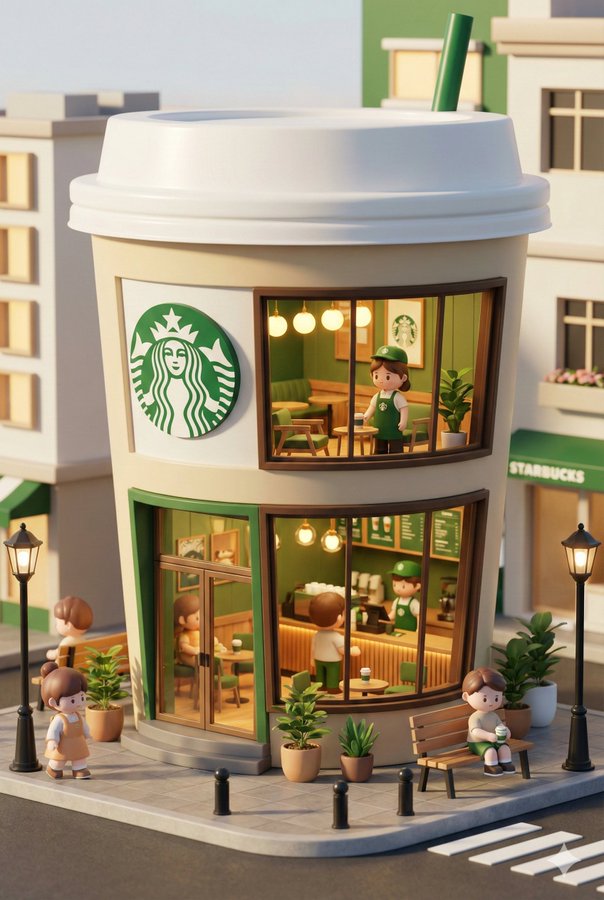
3D chibi-style miniature concept store of {Brand Name}, creatively designed with an exterior inspired by the brand's most iconic product or packaging (such as a giant {brand's core product, e.g., chicken bucket/hamburger/donut/roast duck}). The store features two floors with large glass windows clearly showcasing the cozy and finely decorated interior: {brand's primary color}-themed decor, warm lighting, and busy staff dressed in outfits matching the brand. Adorable tiny figures stroll or sit along the street, surrounded by benches, street lamps, and potted plants, creating a charming urban scene. Rendered in a miniature cityscape style using Cinema 4D, with a blind-box toy aesthetic, rich in details and realism, and bathed in soft lighting that evokes a relaxing afternoon atmosphere. --ar 2:3
5. Workplace & Productivity
5.1. Hand-drawn Flowchart to Corporate Charts
Convert this hand-drawn whiteboard sketch into a professional corporate flowchart suitable for a business presentation. Style Guide : Use a minimalist 'McKinsey-style' aesthetic : clean lines, ample whitespace, and a sophisticated blue-and-gray color palette. Structure : Automatically align all boxes and diamonds to a strict grid . Connect them with straight, orthogonal arrows (90-degree angles only, no curvy lines). Text : Transcribe the handwritten labels into a clear, bold Sans-Serif font (like Arial or Roboto). Output : High-resolution vector-style image on a pure white background.
6. Photo Editing & Restoration
6.1. Composition Rescue (Smart Outpainting)
Zoom out and expand this image to a 16:9 aspect ratio (computer wallpaper size). Context Awareness : Seamlessly extend the scenery on both left and right sides. Match the original lighting, weather, and texture perfectly. Logical Completion : If there are cut-off objects (like a shoulder, a tree branch, or a building edge) on the borders, complete them naturally based on logical inference. Do not distort the original center image.
7. Interior Design
7.1. Hard Furnishing Preview (Floor Plan to Design)
Based on the uploaded 2D floor plan, generate a professional interior design presentation board in a single image. Layout : The final image should be a collage with one large main image at the top, and several smaller images below it. Content of Each Panel :
1. Main Image (Top) : A wide-angle perspective view of the main living area , showing the connection between the living room and dining area.
2. Small Image (Bottom Left) : A view of the Master Bedroom , focusing on the bed and window.
3. Small Image (Bottom Middle) : A view of the Home Office / Study room .
4. Small Image (Bottom Right) : A 3D top-down floor plan view showing the furniture layout. Overall Style : Apply a consistent Modern Minimalist style with warm oak wood flooring and off-white walls across ALL images. Quality : Photorealistic rendering, soft natural lighting.
9. Daily Life & Translation
9.1. Physical Store/Travel Translation
Translate the Chinese dish names on the wall menu into English for foreign tourists. Texture Preservation : Crucial! Maintain the original aged, greasy, and textured look of the wall/paper. The new English text should look like it was written/printed on the same surface, with slight fading or wear to match. Currency : Keep the '¥' symbol and price numbers exactly as they are ; do not convert currency. Layout : align the English translations next to or replacing the Chinese characters naturally.
10. Social Networking & Avatars
10.1. 3D Blind Box Style Avatar
Converts portraits into cute, C4D-style "Pop Mart" toy characters.
Transform the person in the uploaded photo into a cute 3D Pop Mart style blind box character . Likeness : Keep key features recognizable: [hair color, glasses, hairstyle]. Style : C4D rendering, occlusion render, cute Q-version , soft studio lighting, pastel colors. Background : A simple, solid matte color background (e.g., soft blue). Detail : The character should have a smooth, plastic toy texture with a slight glossy finish. Facing forward, friendly expression.
11. Resources
- Official Prompting Guide - Learn how to structure your prompts effectively.
- How to prompt Nano Banana Pro
8. Social Media & Marketing
8.1. Viral Cover Image (Youtube/Douyin/TikTok)